Makerspaces, Constructionism and Makeblock Neuron

Makerspaces

With the rapid development of technology, exploring more efficient and advanced teaching methods has become the goal of many teachers and students (Plus Company Updates, 2018). Makerspaces allow for the integration of STEM in the classroom in an authentic and engaging way, by creating for a purpose. It’s not creating something without meaning, it’s also about the application of the student’s design. It aims to encourage critical thinking and reflection from students by developing creative solutions to authentic problems. Creating authentic makerspaces in school will be challenging because the traditional school pedagogies and curriculum are in direct opposition to the kinds of learning that take place in makerspaces (Lindstrom, Thompson, & Schmidt-Crawford, 2017).

Constructionism

Papert’s Constructionism builds upon Piaget’s Constructivism and claims that the construction of knowledge occurs when students build, make and publicly share objects (Blinkstein, 2013). It is a learning theory where learning is predicated from the active construction of a shareable artefact (Martinez & Stager, 2019). Teachers act as facilitators in an environment where students are actively making instead of being passive recipients of instruction. It permits the acknowledgement and embracing of different learning styles and epistemologies, creating a friendly environment in which students can construct their ideas and projects with intense personal engagement (Blinkstein, 2013). Technology in schools is not a way to optimise traditional education, but rather it is an emancipatory tool that puts the most powerful construction materials in the hands of children (Blinkstein, 2013). These open-ended tasks foster creativity by allowing students to design something however they like.

Makeblock Neuron

Makeblock Neuron was designed as a smart electronic block platform to help children play games, invent tools and DIY gadgets, learn programming and encourage teamwork while playing (Wireless News, 2018). Makeblock Neuron affords opportunities to inspire creativity and ingenuity in children. Visual feedback from the hardware is immediate, making it easy for children to see if their design worked as planned. The education product empowers children to be creative in an intuitive manner. Makeblock Neuron allows for invention to be easier and faster, expanding the opportunity for out-of-the-box creation for children (Wireless News, 2018). There are more than 30 unique coloured modules, like power sources and sensors, inputs and outputs for children to easily identify and manipulate (Wireless News, 2018). These modules can be combined with themselves or other everyday materials to solve authentic problems.
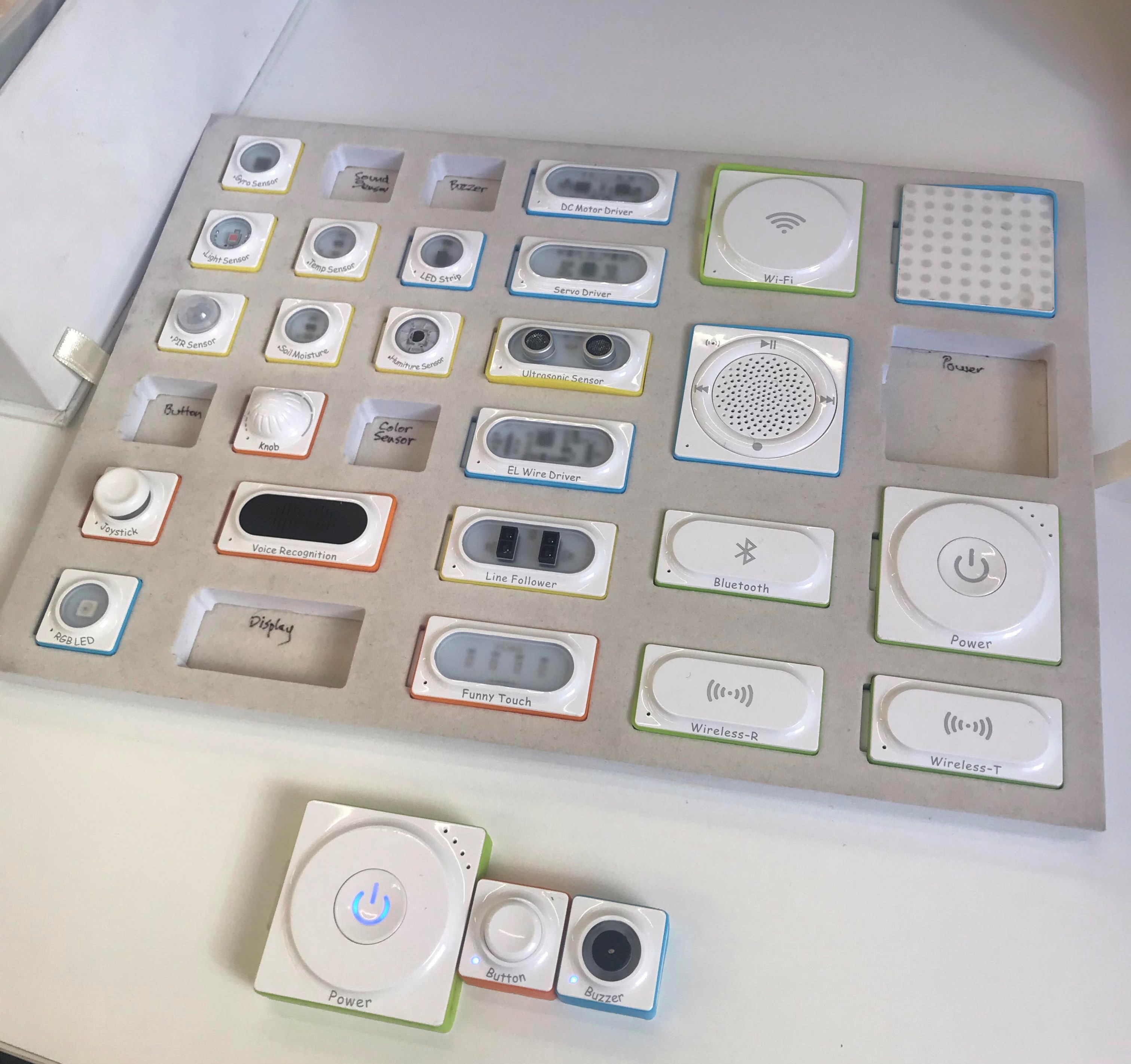
Makeblock Neuron modules (EDUC362 tutorial)

References

Blikstein, P. (2013). Digital fabrication and ‘making’ in education: The democratization of invention. FabLabs: Of Machines, Makers and Inventors

Lindstrom, D., Thompson, A.D., & Schmidt-Crawford, D.A. (2017). The maker movement: democratizing STEM education and empowering learners to shape their world. Journal of Digital Learning in Teacher Education, 33(3).

Martinez, S., & Stager, G. (2019). The maker movement: A learning revolution. International Society for Technology in Education. Available at: https://www.iste.org/explore/articleDetail?articleid=106

Plus Company Updates. (2018). Makeblock Neuron Wins 2018 Gold Edison Awards.

TEDx Talks. (2015). Makerspace: Make Community | Jamie Leben | TEDxFrontRange [Video]. Retrieved from https://www.youtube.com/watch?v=CQnXaShzuHw

Wireless News. (2018). Makeblock Neuron Gets 2018 Gold Edison Awards.
Digital Game Creation Tools

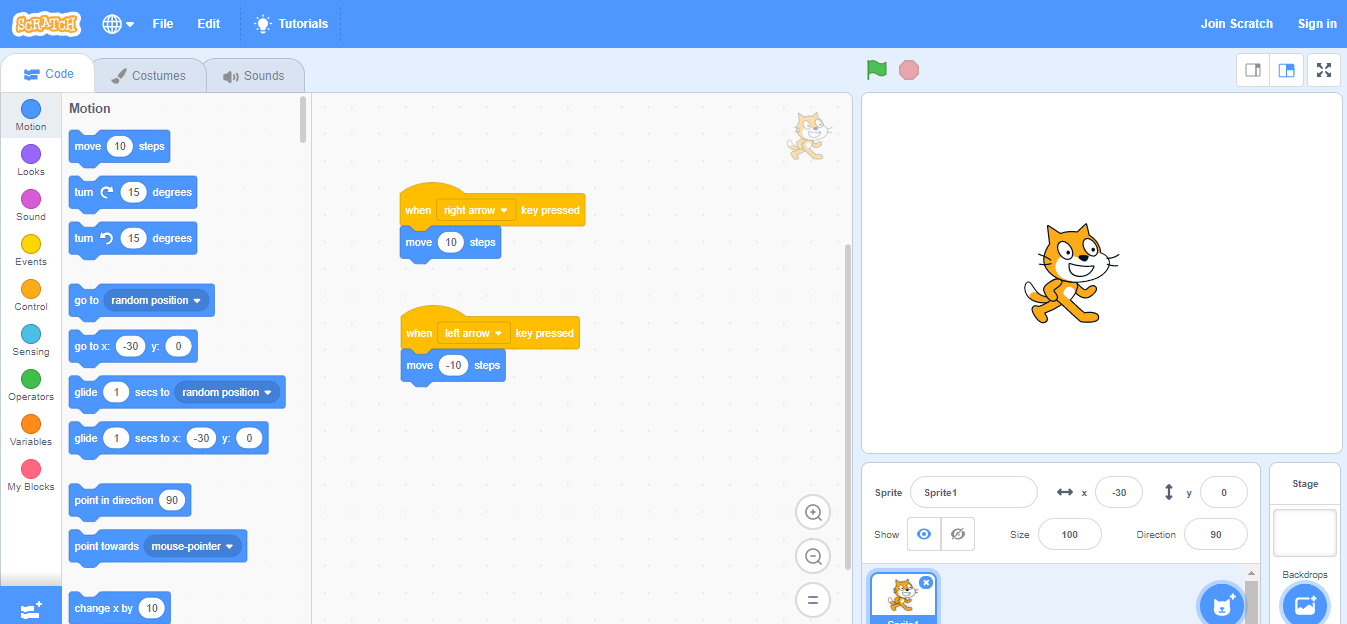
Scratch is a free visual programming language aimed at children who are learning to program. Scratch turns children from media consumers into media producers, enabling them to create their own interactive stories, games, music, and animations (Schorow, 2007). Scratch helps young people learn 21st Century skills, including how to think creatively, reason systematically and work collaboratively.

Children construct knowledge based on active engagement in learning experiences (Lamb & Johnson, 2011). Scratch allows children to be actively engaged when learning to write programs based on their interests. A student may have a passion for cars and therefore constructs knowledge by programming a car to move around. Another student may have a story to tell, but struggles to express themselves on paper. Instead they could write a program to tell that story.

Screenshot of Scratch

Tools like Scratch can empower students to express their creativity like never before; however, the way these tools are taught by teachers and used by students significantly influences whether students move along the creativity continuum (Yadav & Cooper, 2017). Fortunately, the Scratch software is intuitive for beginners. This ease-of-use allows students to focus on language development, creativity, logic, reasoning and problem-solving, rather than learning how to use the tool itself (Lamb & Johnson, 2011).

The website lets users blend together different media (including graphics, sound, and other programs) in creative ways by “remixing” projects (Schorow, 2007). There is a strong emphasis on downloading other people’s work and users creating their own derivative. By sharing their work, students could discover their own mistakes and learn effective or better solution methods from others (Chiang & Qin, 2018). It allows for more opportunities to debug any issues in the programming. The creation of games by students can be a co-operative learning activity or an individual activity. It provides a lot of opportunity for students to showcase their program design and share them with their friends.

Learning basic programming from a platform like Scratch has a wide range of benefits. It is highly motivating for students and empowers them to pursue their studies in programming (Ouahbi, Kaddari, Darhmaoui, Elachqar & Lahmine, 2015). This study (2015) found that 65% of students who have experienced Scratch would consider continuing programming, compared to 10% who used a standard programming platform. Chiang and Qin (2018) found significant improvements in students’ equation-solving performance and in their attitudes towards learning mathematics with the assistance of technology.

Often children play video games after doing their homework. Now imagine a world where playing and creating video games is the assigned homework.

Games Created with Scratch

Fortress Escape

Jump Mario

Dirt Bike Demon

References

Chiang, F., & Qin, L. (2018). A Pilot study to assess the impacts of game-based construction learning, using scratch, on students’ multi-step equation-solving performance. Interactive Learning Environments26(6).

Lamb, A., & Johnson, L. (2011). Scratch: Computer Programming for 21st Century Learners. Teacher Librarian38(4).

MIT Scratch Team. (2019). Scratch! [Video]. Retrieved from https://www.youtube.com/watch?v=98awWpkx9UM

Ouahbi, I., Kaddari, F., Darhmaoui, H., Elachqar, A., & Lahmine, S. (2015). Learning Basic Programming Concepts by Creating Games with Scratch Programming Environment. Procedia – Social And Behavioral Sciences191.

Yadav, A., & Cooper, S. (2017). Fostering creativity through computing. Communications Of The ACM60(2).

How Virtual Reality Influences Creativity

Virtual reality learning environments get learners directly involved by exploring ideas in real time and in experimental settings (Shin, 2017). There are many affordances from immersion into a virtual reality learning environment. It allows for multiple perspectives shifting between an exocentric and an egocentric frame of reference (Dede, 2009). An exocentric frame of reference provides a view of an object from the outside. An egocentric frame of reference provides a view from within a central space.

(A) Exocentric frame of reference. (B) Egocentric frame of reference

It can enhance education through situated learning. Students build confidence in their academic abilities by putting aside their real-world identity and shifting their perspective to an expert in a virtual context. These simulated experiences may have the potential to release trapped intelligence and engagement in many learners (Dede, 2009).

Immersion improves transfer of knowledge and skills to real situations through contextualisation of learning (Dalgarno & Lee, 2009). Students who excel in educational settings often are unable to apply what they have learned to similar real-world contexts (Dede, 2009). The simulation of real-world problems allows students to easily transfer knowledge from one situation to another and assist in future learning.

Study: Examining Creativity Through a Virtual Reality Support System (Yang et al., 2018).

This study (Yang et al., 2018) looked to examine the impact of an immersive virtual reality support environment on individual’s creativity performance. It compared a paper-and-pencil control condition and the immersive virtual reality experimental condition. The researchers found that the immersive virtual reality environment was more beneficial for the quality of individual creative products. 3D tools were more beneficial to provide a rich stimulus for the participants’ creativity.

Virtual reality experiences can influence creativity in two distinct ways. It can be used directly as a tool in the creative process. It can also assist individuals to explore, collect, share, and integrate knowledge during the process of generating creative ideas.

Participants can walk around a 3D environment and observe it from various angles and different distances, providing stimuli for more distinctive, novel ideas. Furthermore, it inspires individuals to adopt innovative ways, and to be free from past ideas or experiences. Individuals can enter the flow state more easily which allows them to be more creative. It increases problem-solving and it creates a positive and pleasant mood. Immersive virtual reality could facilitate improved focus and more mental intensity in individuals, which could result in higher creative performances.

References

AMD. (2016). VR in Education [Video]. Retrieved from https://www.youtube.com/watch?v=EXYzj6qwCCk

Dalgarno, B., & Lee, M. (2009). What are the learning affordances of 3-D virtual environments?. British Journal Of Educational Technology41(1).

Dede, C. (2009). Immersive Interfaces for Engagement and Learning. Science323(5910).

Shin, D. (2017). The role of affordance in the experience of virtual reality learning: Technological and affective affordances in virtual reality. Telematics And Informatics34(8).

Yang, X., Lin, L., Cheng, P., Yang, X., Ren, Y., & Huang, Y. (2018). Examining creativity through a virtual reality support system. Educational Technology Research And Development66(5).

Learning About Space with Augmented Reality

Augmented reality involves overlaying rich media onto the real world for viewing through phones and tablet devices which means that information can be made available to students at the exact time and place of need (Bower, Howe, McCredie, Robinson & Grover, 2014). The virtual objects which appear on the device may include text, images, videos, sounds, 3D models or animations. Augmented reality requires Image Recognition Software, which enables real-world images and objects to act as “triggers” for multimedia and model overlays, and also to anchor virtual data in the environment (Bower et al., 2014). The purpose is for these objects to accompany the real-world environment.

The possibilities of augmented reality seem endless. One of the most popular applications is gaming. It can be used in education to illustrate interactive models. Live television events can be enhanced by overlaying content on the screen. Potential customers can see how furniture will look in their home before they buy it.

Space 4D+Flashcards

Flashcards don’t have to be boring. The Space 4D+ Flachcards by Octagon Studio allows users to view interesting and informative facts about the Solar System, planets, satellites, rovers, space objects and space missions in an innovative way.

Users can rotate the planets on their touchscreen to view them from different angles. They can see the difference in the size of the planets and control the movement of the rovers on the Moon or Mars (“Space4D+ Flashcards”, n.d.). Users can also view the various moons orbiting their planets and the planets orbiting the Sun. All that is required is to download the app on a smartphone or tablet and scan the flashcards to see the Solar System come alive.

Use in the Classroom

Augmented reality apps enable teachers to create augmented reality experiences around themes. The topic of Earth and Space is one example. My first blog includes other educationally-rich augmented reality experiences.

The flashcards work well as an introductory activity for students. The Space 4D+ Flashcards would make a great resource to teach students about the Earth and Space, and visually compare the Earth to other planets in the Solar System. Students compare the key features of the planets of our Solar System, including the time it takes for the planets to revolve around the Sun, the size of the planets and the distance of the planets from the Sun (NSW Education Standards Authority, 2017).

References

Bower, M., Howe, C., McCredie, N., Robinson, A., &Grover, D. (2014). Augmented Reality in education – cases, places and potentials. Educational Media International51(1),1-15.

NSW Education Standards Authority. (2017). Science and Technology K-6 Syllabus.

Space 4D+ Flashcards.Retrieved from https://store.octagonstudio.com/products/space-4d

Ozobot: Coding and Creativity

Previously, I wrote about augmented reality and how it enhances student creativity. Well, the Ozobot moves kids from augmented reality back to physical play. The Ozobot draws kids into learning about programming and teaches basic coding concepts like cause and effect as well as debugging. The Ozobot offers children an expressive way to learn and play with robotics in a variety of social and interactive settings (Orman, 2014). By allowing learners to engage in the learning experiences of robotics, young students are not just passive knowledge receivers nor technology consumers, they can take initiative roles as co-constructors of learning (Jung & Won, 2018).

Robotics education has a means of empowering learners and providing authentic learning (Jung & Won, 2018). It provides increased participation as the students have something tactile and intriguing to interact with. It is accessible and motivational across gender and ethnicity boundaries. It is systemic and sustainable, meaning it can be used by all teachers to teach all students.

The Ozobot uses optics to calibrate sensors. Kids use coloured markers (black, red, green and blue), to program the Ozobot to follow a path forward, backwards, fast, slow, right, left and more (Orman, 2014).

Ozoblocky.com

The Ozobot can also be programmed at the Ozoblocky website (Ozoblockly.com), which provides more options for educational use. Ozoblocky affords users to drag-and-drop commands into a work space to create games, patterns or paths (Hanson, 2016). It allows students create their own games or patterns, as well as use existing challenges and examples to explore programming movement, light effects, loops, and logic (Hanson, 2016). Students can then load the program from the internet browser by holding the optical sensor up to the screen.

Classroom Application

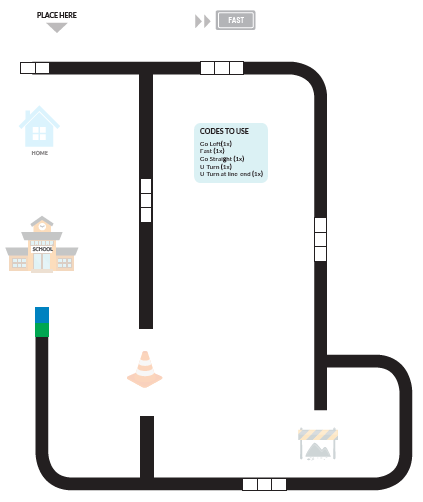
A classroom activity for students could be coding the Ozobot to travel from home to its desired destination across a map. The students must make sure it obeys the road rules and doesn’t get lost.

Help Ozobot make it from school to home without getting stuck or going the wrong way!

Another activity could use the Ozobot as a character in a story. It travels across a story map with the little robot stopping off at different images of scenes which fit the narrative of the story. Students could even draw the scenes or attach a costume to integrate art into the lesson.

Ozobot as Little Red Riding Hood

A teacher might draw a map with multiple destinations and students must predict where the Ozobot will finish, based on the coloured codes on the map.

References

Education Technology Specialists. (2017). Ozobot Bit – Little Red Riding Hood Video[Image]. Retrieved from https://www.youtube.com/watch?v=Xd686C5-Ds0

Hanson, J. (2016). Tiny Bot Gamifies Coding. School Library Journal62(2).

Jung, S., & Won, E. (2018). Systematic Review of Research Trends in Robotics Education for Young Children. Sustainability10(4).

Orman, L. (2014). Tiny Ozobot Is First Augmented Reality Toy for the Smartphone Generation. PRWeb Newswire.

Cubetto: A Child’s First Coding Kit

Computational Thinking

Computational thinking is the thought processes involved in formulating a problem and expressing solutions in such a way that a computer can effectively carry out. It is a way of solving problems, designing systems, and understanding human behaviour that draws on concepts fundamental to computer science. It makes use of different levels of abstraction, to understand and solve problems more effectively

(“Digital Technologies and ICT Resources”, n.d.).

Computational thinking allows us to solve problems, design systems, and understand the power and limits of human and machine intelligence. Students who can think computationally are more able to conceptualise, understand and use computer-based technology (Computing in the National Curriculum – A guide for primary teachers, 2013).

Cubetto

Cubetto is a coding robot which allows children to explore coding from a young age. It is a playful wooden robot that helps young children discover programming through storytelling, adventure and collaboration (“Cubetto”, 2019). Its aim is to help children aged 3 years and older to think computationally. It makes coding accessible to toddlers, but with no screen or keyboard. (“Child’s Play: The Coding Robot for Toddlers”, 2017). It is a toy which can be used in schools to teach STEM skills to children. It enhances creativity, spatial awareness, critical thinking and communication skills.

Cubetto

How it works?

Children insert blocks into the interface board which commands the robot to move around the map. Each block is a command to either turn left, turn right, move forward or execute a function. The children write the sequence and execute for the robot to travel to the desired destination. The experience is so engaging and immersive, that children don’t even realise they are learning computational thinking and logic while they play (“Child’s Play: The Coding Robot for Toddlers”, 2017).

Meet Cubetto

Inclusivity

Cubetto promotes inclusive play. It can be used by visually impaired children and provides gender-neutral play. It helps children with disabilities strengthen their sequencing and communication skills by combining movement, touch and sound (“Primo Toys; Now, Even Preschoolers Can Learn To Code: Innovative, Award-winning Cubetto Available For Purchase Worldwide”, 2016). Cubetto doesn’t require the use of an app, therefore it is accessible to anyone, even if they don’t have a smartphone or tablet (Kolodny, 2017).

References

Child’s Play: The Coding Robot for Toddlers. (2017). Professional Engineering Magazine30(8).

Computing at School. (2013). Computing in the National Curriculum – A guide for primary teachers [Ebook]. Retrieved from https://www.computingatschool.org.uk/data/uploads/CASPrimaryComputing.pdf

Cubetto. (2019). Retrieved from https://www.teaching.com.au/catalogue/mta/mta-ict-robotics-cubetto

Digital Technologies and ICT Resources. Retrieved from http://educationstandards.nsw.edu.au/wps/portal/nesa/k-10/learning-areas/technologies/coding-across-the-curriculum

Primo Toys. (2016). Meet Cubetto [Video]. Retrieved from https://www.youtube.com/watch?v=Kp1p2lh2D64

Primo Toys; Now, Even Preschoolers Can Learn To Code: Innovative, Award-winning Cubetto Available For Purchase Worldwide. (2016). Computer Weekly News.

3D Printing in the Classroom

Design Thinking is a methodology used to solve problems, and find desirable solutions. It focuses on the solution, rather than the problem. It draws upon logic, imagination, intuition, and systemic reasoning, to explore possibilities of what could be. It also aims to creates desired outcomes that benefit the end user.

(Naiman, 2016)

Design Thinking

Design thinking encourages people to explore new alternatives, creating options that did not exist before. It involves thinking conceptually and imaginatively, or ‘outside the box’. Design thinking requires frequent reconsidering the problem, it requires flexibility and is a social experience. Design thinking is used to enhance learning and promote creative thinking, teamwork, and student responsibility for learning (Razzouk & Shute, 2012). It encourages ideation, meaning gathering a wide range of ideas. It reduces the risks associated with these new ideas.

3D Printing

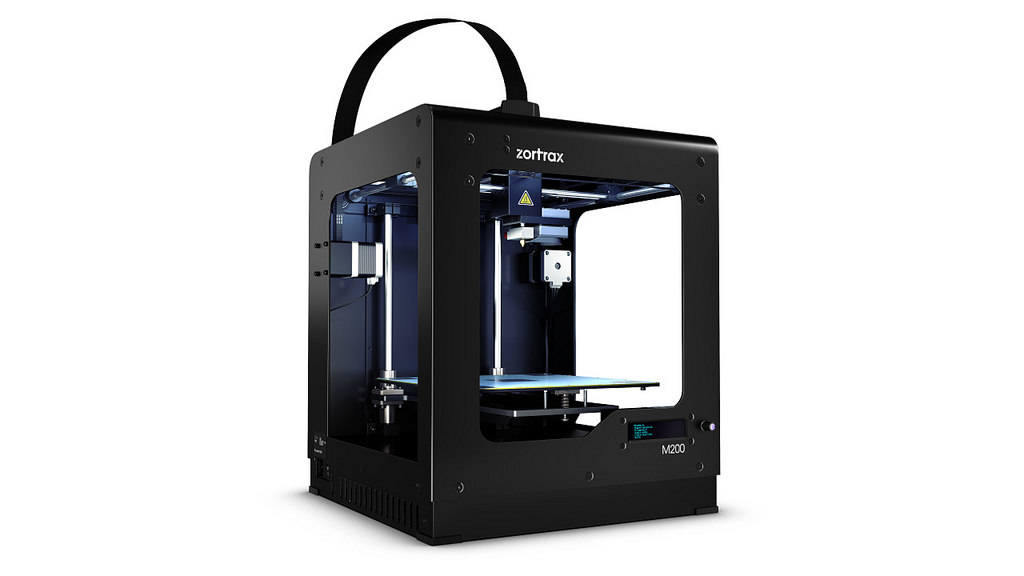
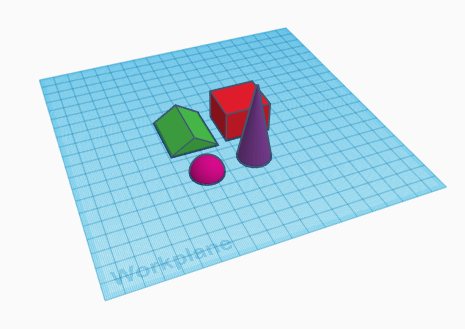
Design thinking can be taught to students through 3D printing technology. 3D printing technology brings students’ designs into reality and makes their experience meaningful (Ng, 2017). Students use computer-aided drafting (CAD) software to create a 3D model of a product which then gets sent to the 3D printer to be produced. Students are more motivated knowing they will be able to hold their designs when printed. Without 3D printing technology, they might respond differently, feeling that designing is a meaningless activity. CAD software can also be used to help students conceptualise mathematical concepts, such as the volume of solids. Greenhalgh (2016) found that the majority of students who used 3D printing self-reported that the process was surprisingly easier than expected. Students should have little issue obtaining the skills to use CAD software and a 3D printer.

Tinkercad

Reasons for 3D Printing in the Classroom

  • To illustrate tangible models. Eg. Physical examples of architectural objects, historical objects, molecular structures, etc.
  • It is a relevant technology. It is used by architects, artists and engineers to create innovative designs.
  • It is interdisciplinary. It requires use of computers. You need to know about design process, modelling, mathematics, engineering.
  • Inspires creativity and imagination. Anything can be produced.
  • Increases spatial intelligence and ability to visualise 3D forms. You can work abstractly on the computer then have the object in your hand.
  • It’s new and exciting. Not everyone has seen one.

References

Greenhalgh, S. (2016). The effects of 3D printing in design thinking and design education. Journal Of Engineering, Design And Technology14(4), 752-769.

Naiman, L. (2016). Design Thinking as a Strategy for Innovation. Retrieved from https://www.creativityatwork.com/design-thinking-strategy-for-innovation/

Greenhalgh, S. (2016). The effects of 3D printing in design thinking and design education. Journal Of Engineering, Design And Technology14(4), 752-769.

Naiman, L. (2016). Design Thinking as a Strategy for Innovation. Retrieved from https://www.creativityatwork.com/design-thinking-strategy-for-innovation/

Ng, O. (2017). Exploring the use of 3D Computer-Aided Design and 3D Printing for STEAM Learning in Mathematics. Digital Experiences In Mathematics Education3(3), 257-263.

Razzouk, R., & Shute, V. (2012). What Is Design Thinking and Why Is It Important?. Review Of Educational Research82(3).

Seton Hall University. (2016). 6 Reasons for Integrating 3D Printing Into Your Classroom [Video]. Retrieved from https://www.youtube.com/watch?v=hnvjGCIEuK0

Augmented Reality and Augmented Creativity

Augmented reality is technology that projects digital materials onto real world objects (Cuendet et al., 2013). It is well suited to the nurturing of creativity and imagination. Textbooks and flashcards may contain embedded markers, that when scanned by a tablet, produce additional multimedia information. Augmented reality encourages student engagement in authentic exploration of the real world and increases motivation (Wu et al., 2013). Instead of remaining passive recipients, students can become active learners and interact with their learning environment by turning simple tasks into creative playgrounds.

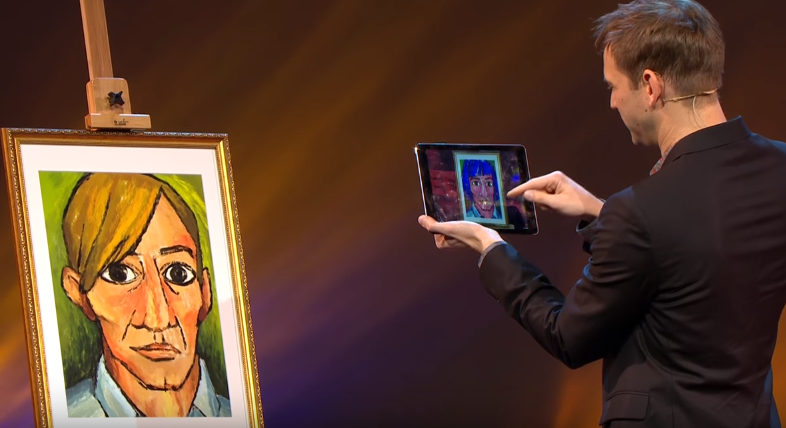
Bob Sumner, the Associate Director of Disney Research, gives his TED Talk on augmented creativity.

Augmented creativity is children interacting with the physical environment in a playful and creative way. It provides magical digital overlays on top of tradition real-world creative activities. It can be used to enhance creativity in a number of ways by using a tablet.

  • The first demonstration includes a blank colouring-in page of a woman. When the student colours in her dress, it dynamically projects it onto the 3D representation of the woman.
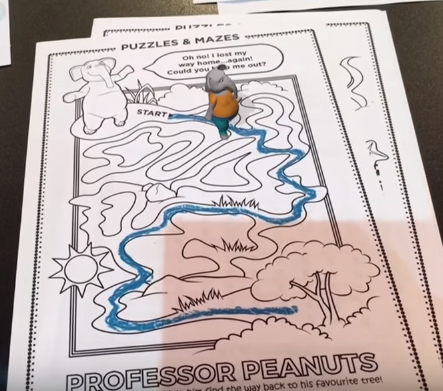
  • A student completes a maze. A 3D character is then projected onto the maze and walks from start to finish. The system validates that the maze was correct.
  • The tablet is pointed at a portrait and then can be edited by changing the colours, hair style, size of eyes or nose, etc.
  • A teacher stamps a student’s work. The tablet recognises the mark on the paper and projects the corresponding character onto the screen. The characters can also battle each other for added student engagement.

Augmented reality doesn’t have to be solely visual, it can also be audial. An activity could be used to enhance the creativity in students and give an introduction to the styles of music and instruments.  Several cards are placed on the table with different instruments and musical styles printed on them. Instead of students passively listening to music styles, they can mix the music to actively learn by creating different sounds.

Criticisms

A lack of training to provide the necessary skills may force teachers to struggle to put the augmented reality technology into practice. Teachers, schools and their leaders must be very open-minded to apply augmented reality to education. As tablets can be quite expensive, not all schools will have the necessary number to accommodate their students. The tasks may be too open-ended and would require explicit guidelines set out by the teacher.

References

Cuendet, S., Bonnard, Q., Do-Lenh, S., & Dillenbourg, P. (2013). Designing augmented reality for the classroom. Computers & Education68, 557-569.

Sumner, B. (2017). Augmented Creativity | Bob Sumner | TEDxZurich [Video]. Retrieved from https://www.youtube.com/watch?time_continue=217&v=AJJOWemfOYI

Wu, H.-K., Lee, S. W.-Y., Chang, H.-Y., & Liang, J.-C. (2013). Current status, opportunities and challenges of augmented reality in education. Computers & Education, 62, 41-49.