
Previously, I wrote about augmented reality and how it enhances student creativity. Well, the Ozobot moves kids from augmented reality back to physical play. The Ozobot draws kids into learning about programming and teaches basic coding concepts like cause and effect as well as debugging. The Ozobot offers children an expressive way to learn and play with robotics in a variety of social and interactive settings (Orman, 2014). By allowing learners to engage in the learning experiences of robotics, young students are not just passive knowledge receivers nor technology consumers, they can take initiative roles as co-constructors of learning (Jung & Won, 2018).
Robotics education has a means of empowering learners and providing authentic learning (Jung & Won, 2018). It provides increased participation as the students have something tactile and intriguing to interact with. It is accessible and motivational across gender and ethnicity boundaries. It is systemic and sustainable, meaning it can be used by all teachers to teach all students.
The Ozobot uses optics to calibrate sensors. Kids use coloured markers (black, red, green and blue), to program the Ozobot to follow a path forward, backwards, fast, slow, right, left and more (Orman, 2014).
Ozoblocky.com
The Ozobot can also be programmed at the Ozoblocky website (Ozoblockly.com), which provides more options for educational use. Ozoblocky affords users to drag-and-drop commands into a work space to create games, patterns or paths (Hanson, 2016). It allows students create their own games or patterns, as well as use existing challenges and examples to explore programming movement, light effects, loops, and logic (Hanson, 2016). Students can then load the program from the internet browser by holding the optical sensor up to the screen.
Classroom Application
A classroom activity for students could be coding the Ozobot to travel from home to its desired destination across a map. The students must make sure it obeys the road rules and doesn’t get lost.
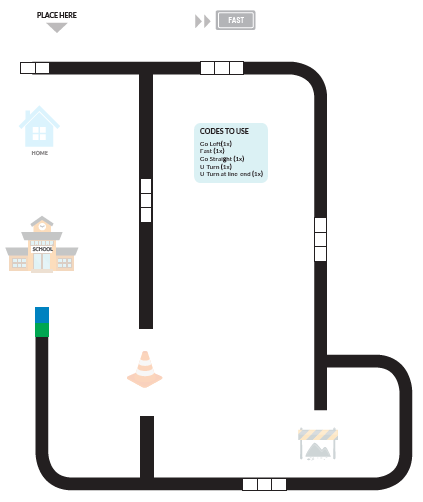
Another activity could use the Ozobot as a character in a story. It travels across a story map with the little robot stopping off at different images of scenes which fit the narrative of the story. Students could even draw the scenes or attach a costume to integrate art into the lesson.
A teacher might draw a map with multiple destinations and students must predict where the Ozobot will finish, based on the coloured codes on the map.
References
Education Technology Specialists. (2017). Ozobot Bit – Little Red Riding Hood Video[Image]. Retrieved from https://www.youtube.com/watch?v=Xd686C5-Ds0
Hanson, J. (2016). Tiny Bot Gamifies Coding. School Library Journal, 62(2).
Jung, S., & Won, E. (2018). Systematic Review of Research Trends in Robotics Education for Young Children. Sustainability, 10(4).
Orman, L. (2014). Tiny Ozobot Is First Augmented Reality Toy for the Smartphone Generation. PRWeb Newswire.
 A Conversation: Digital Creativity and Learning